

Most Janitor AI guides hand you a list of buttons and vanish the second something breaks. This one doesn’t. By the end, you’ll have DeepSeek running for free, tuned with the right settings, and you’ll know how to fix the errors that send everyone else back to Google.
DeepSeek matters here for one reason: it delivers near GPT‑4o quality roleplay at a fraction of the price. If you’ve been hunting for the cheapest alternative to GPT‑4o on Janitor AI, DeepSeek is where most people land. Let’s get it working properly.
Quick answer: To set up DeepSeek on Janitor AI, create an OpenRouter API key, open Janitor AI’s Proxy/API settings, choose the OpenAI‑compatible option, paste
https://openrouter.ai/api/v1/chat/completionsas the proxy URL, add your key, enter the modeldeepseek/deepseek-r1:free, save, refresh, and send a test message.
Why People Pick DeepSeek for Janitor AI
Two things make DeepSeek stand out for roleplay.
First, cost. The model is genuinely cheap, and as you’ll see below, you can run it for free. Heavy GPT‑4 users burn $20–50 a month. DeepSeek keeps that near zero.
Second, it has bite. This is the part nobody talks about. ChatGPT tends to agree with you and smooth every edge — fine for work emails, dull for roleplay. DeepSeek pushes back. Characters argue, hold a grudge, and stay in their lane instead of melting into a yes‑machine. That friction is what makes a scene feel alive, and it’s the single biggest reason long‑time roleplayers switch.
One thing to lock in before we touch any settings.
How the DeepSeek + Janitor AI Connection Works
Janitor AI doesn’t run any AI model itself. It’s a front end — a chat interface that talks to an outside model through an API. So “using DeepSeek on Janitor AI” means three pieces working together:
- You get an API key.
- You tell Janitor AI where to send your messages.
- Your chats route through that model.
Get one of those three wrong and the whole thing fails, often with no clear error. DeepSeek follows the OpenAI‑compatible API format, which is exactly why Janitor AI can talk to it.
You have three routes: the direct DeepSeek API, OpenRouter, and Chutes. We’ll use OpenRouter as the main path, because that’s how you run DeepSeek R1 free on Janitor AI — and we’ll set up Chutes as a backup later.
How to Set Up DeepSeek on Janitor AI: Step by Step
Here’s the full OpenRouter setup. Budget about five minutes. <!– IMAGE: step screenshots — alt: “openrouter deepseek v3 janitor ai setup steps” –>
Step 1: Create an OpenRouter account
Head to openrouter.ai and sign up. No credit card needed to start.
Step 2: Generate your API key
Open your account menu, go to Keys, and create a new key. Copy it once and store it somewhere safe — treat it like a password. Anyone who gets your key can spend on your account.
Step 3: Open Janitor AI’s API settings
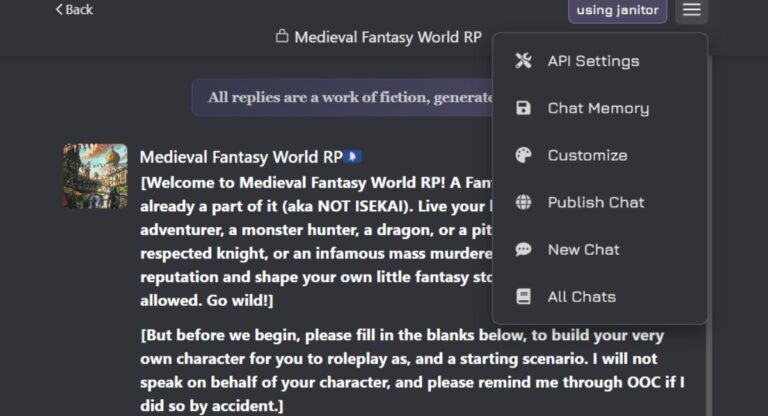
Open the character you want to chat with, start a chat, and find API Settings or Proxy Settings. Janitor AI usually exposes these from inside the chat, not from a separate page. Choose the Custom / OpenAI‑compatible option.
Step 4: Enter the endpoint, key, and model
This is where everyone fumbles. The URL, the key, and the model name must all belong to the same route. Mixing a DeepSeek key with an OpenRouter URL is the number‑one cause of “Network Error.” For OpenRouter, use:
- Proxy URL:
https://openrouter.ai/api/v1/chat/completions - API key: your OpenRouter key
- Model name:
deepseek/deepseek-r1:free
Want the chat model instead of the reasoning one? Use deepseek/deepseek-chat-v3-0324:free — that’s the V3 free slug, and it’s the better pick for most roleplay. For the paid, higher‑limit versions, drop the :free suffix.
That suffix is not optional on free models. Drop it and you’ll either get billed or get nothing. OpenRouter’s slugs change over time, so if one stops working, open the OpenRouter models page and grab the current free DeepSeek variant.
Step 5: Save, refresh, and test
Save, refresh the page, then send something simple like “Reply in one short sentence.” A clean reply means you’re live. If it stalls, jump to the troubleshooting section — it’s almost always one of three things.
How to Use DeepSeek R1 Free — The $10 Trick
Here’s the part barely anyone explains correctly.
On a brand‑new OpenRouter account with no credits, free models cap at 50 requests per day. That’s gone in one decent session. But the moment your account has ever held at least $10 in credits, that cap jumps to 1,000 requests per day on free models, per OpenRouter’s official rate‑limit documentation.
The trick: you don’t have to spend the $10. OpenRouter raises your limit because you’ve purchased credits at some point — even if your balance later drops, the higher cap stays. Add $10, leave it there, and you’ve unlocked 1,000 free DeepSeek messages a day. The credit doesn’t expire.
A few honest caveats so you don’t get caught out:
- The 20 requests‑per‑minute ceiling stays the same. Only the daily number changes.
- Failed requests still count against your quota, so errors cost you.
- Free models get rate‑limited during peak hours, and you’ll see a
429error. That’s a wait, not a bug.
⚠️ Reality check on “free”: free DeepSeek availability swings a lot. Some weeks the free slug is fast; other weeks it’s overloaded or temporarily pulled. Treat the free tier as your default and a $2–5 paid balance as your reliable fallback for busy evenings.
Best Settings for DeepSeek on Janitor AI
DeepSeek does not behave like GPT. Copy your old ChatGPT settings over and you’ll get rambling, repetitive, or off‑character replies. Use this as your starting point instead.
| Setting | Recommended value | Why |
|---|---|---|
| Temperature | 0.7 – 0.85 (start at 0.8) | High enough for creativity, low enough to stay coherent |
| Top‑p | 0.9 | Varied word choice without going random |
| Max tokens | 1,024 – 2,000 | Full replies without runaway cost |
| Frequency penalty | 0.0 | DeepSeek already avoids repetition; pushing this breaks flow |
| Presence penalty | 0.0 – low | Leave near zero unless replies feel stuck |
If responses ever feel erratic, lower the temperature first — don’t touch top‑p. That single habit fixes most “DeepSeek feels broken” complaints. So the best temperature settings for DeepSeek on Janitor AI sit in that 0.7–0.85 band, not the 1.0+ some old guides still recommend.
How to Stop DeepSeek From Breaking Character
A frequent complaint: DeepSeek exaggerates a character’s traits. A mildly grumpy character turns into a screaming villain. A shy one goes mute. Roleplayers call it the “tsundere turned psycho” problem.
Two fixes work together.
Drop your temperature toward 0.7. High temperature amplifies whatever personality cue the model latches onto, so cooling it down keeps traits proportional.
Then tighten your system prompt. Don’t just say “she is angry.” Set boundaries: “She’s sarcastic and short‑tempered, but never cruel, and she calms down when respected.” DeepSeek follows explicit limits well — vague prompts are what let it spiral. Clear guardrails are how you stop DeepSeek from breaking character on Janitor AI.
How to Hide DeepSeek’s Thinking Tags
On DeepSeek R1 you’ll see <think> blocks where the model spells out its reasoning before answering. R1 is a reasoning model — that’s by design. In roleplay, it shatters immersion.
You have two clean options.
The simplest: switch to a chat model like deepseek/deepseek-chat-v3-0324:free instead of R1. Chat models don’t expose reasoning, so the tags never appear. This is the fastest way to hide DeepSeek thinking tags on Janitor AI.
If you want R1’s depth, suppress the reasoning instead. OpenRouter supports a reasoning parameter that can exclude the thinking output, and you can reinforce it with a short prompt line telling the model not to show internal reasoning. A handy middle‑ground: Janitor AI lets you edit a reply and wrap the reasoning in <think>…</think> manually, which collapses it into a tidy hidden tab inside the chat.
DeepSeek Not Working on Janitor AI? Fix Every Error
Most failures fall into a few buckets. Here’s how to clear each one.
“API key invalid” right after you topped up
This trips up almost every new user. You create the key, add credits, and Janitor AI instantly throws an invalid‑key error. The key usually isn’t wrong — the account just hasn’t finished registering the new balance. Wait a couple of minutes, re‑enter the key (remove it, save, paste it again), and refresh. If you keep seeing a Janitor AI DeepSeek API key invalid after top up message, this timing delay is almost always the cause.
“Load failed (unk)” and timeouts — the Chutes backup
When DeepSeek’s free servers get slammed, requests time out and Janitor AI shows a vague “load failed (unk)” error. Rather than waiting it out, route around it through Chutes, an inference provider Janitor AI references in its own help docs.
Set up Chutes as your backup with these exact values:
- Proxy URL:
https://llm.chutes.ai/v1/chat/completions - API key: your Chutes key (it must start with
cpk_) - Model name:
deepseek-ai/DeepSeek-V3-0324(use V3 to avoid<think>tags)
Note that Chutes’ direct API does not hide reasoning, so pick the V3 model there, not R1. This is the standard fix for the Janitor AI custom proxy DeepSeek “load failed (unk)” error. If a 429 keeps hitting, rotate your free model to another option (Qwen or GLM) and refresh.
Why DeepSeek generates gibberish
Garbled or nonsense output almost always means a settings or model‑ID mismatch — a temperature cranked too high, or a model name that doesn’t match the route. Reset your temperature into the 0.7–0.85 range and confirm the model slug matches your endpoint exactly. That clears up why DeepSeek generates gibberish on Janitor AI in the vast majority of cases.
Mobile vs Desktop Setup
Phone users hit one specific wall. When you copy your key on Android or iOS and switch apps to grab it, the browser sometimes clears your Janitor AI session, wiping the field you just filled.
The fix is order of operations. Copy your key first, return to the same browser tab without closing it, paste, and save immediately. Keep Janitor AI and OpenRouter in one browser instead of bouncing between apps. Desktop avoids this entirely, so if a mobile setup keeps failing, do the first configuration on a computer — your phone holds the session afterward.
DeepSeek V3 vs R1 for Janitor AI Roleplay
Quick guide on which model to pick.
| Model | Strength | Best for |
|---|---|---|
| DeepSeek R1 | Reasoning, planning, slow plot build | Long story arcs, mystery, scheming characters |
| DeepSeek V3 (0324) | Faster, more emotional, no thinking tags | Casual chat, emotional and immersive roleplay |
Short version: pick R1 when you want a model that thinks through a complex plot, and V3 for quick, in‑the‑moment dialogue without <think> clutter. So in the DeepSeek chat vs R1 Janitor AI roleplay debate, most casual users are happier on V3. DeepSeek’s lineup keeps evolving — newer models now exist on the direct API — so check the current list before committing if you want the latest option.
The Pro Move: Claude + DeepSeek “Hybrid Rotation”
This one isn’t in the usual guides, and it’s how experienced US roleplayers get premium quality without paying premium prices the whole way through.
The idea is simple. The opening of any roleplay is where quality matters most — it sets the character’s voice, the world’s rules, and the tone everything else builds on. So spend a little there, save everywhere else.
Here’s the rotation:
- Start on Claude (paid) for the first 8–10 messages. Let it establish the character, lore, and writing style. Claude is excellent at locking in a consistent voice.
- Switch the model to DeepSeek in your Janitor AI config once the scene is set. Don’t start a new chat — stay in the same one.
- Keep chatting on DeepSeek for the long haul. Because the established context already lives in the chat history, DeepSeek carries the voice forward at a fraction of Claude’s cost.
You’re paying Claude prices for the 10 messages that matter and DeepSeek prices for the hundred that follow. Done right, the seam is invisible — and your monthly bill drops hard.
Frequently Asked Questions
Is DeepSeek free on Janitor AI? Yes. Through OpenRouter’s free tier you can run DeepSeek at no cost, and the $10 credit trick raises your limit to 1,000 messages a day without spending the money. Availability fluctuates, so keep a small paid balance as backup.
DeepSeek R1 or V3 — which is better for Janitor AI? R1 for deep, plot‑heavy roleplay; V3 (the 0324 version) for fast, emotional chat with no thinking tags. Most casual users prefer V3.
Why is DeepSeek slow on Janitor AI? Usually free‑server congestion during peak hours. A Chutes backup route or a small paid balance clears it up.
Is the $10 OpenRouter trick safe? Yes. You’re buying credits on a legitimate platform. The credits stay in your account, and the raised daily limit is OpenRouter’s documented behavior.
DeepSeek isn’t plug‑and‑play, but it isn’t hard either once you know the rules: match your URL, key, and model to one route; keep your temperature low; and remember that most “errors” are just timing or congestion. Set it up once, save your config, and you’ve got the cheapest serious roleplay model on Janitor AI running on autopilot.






2 Comments